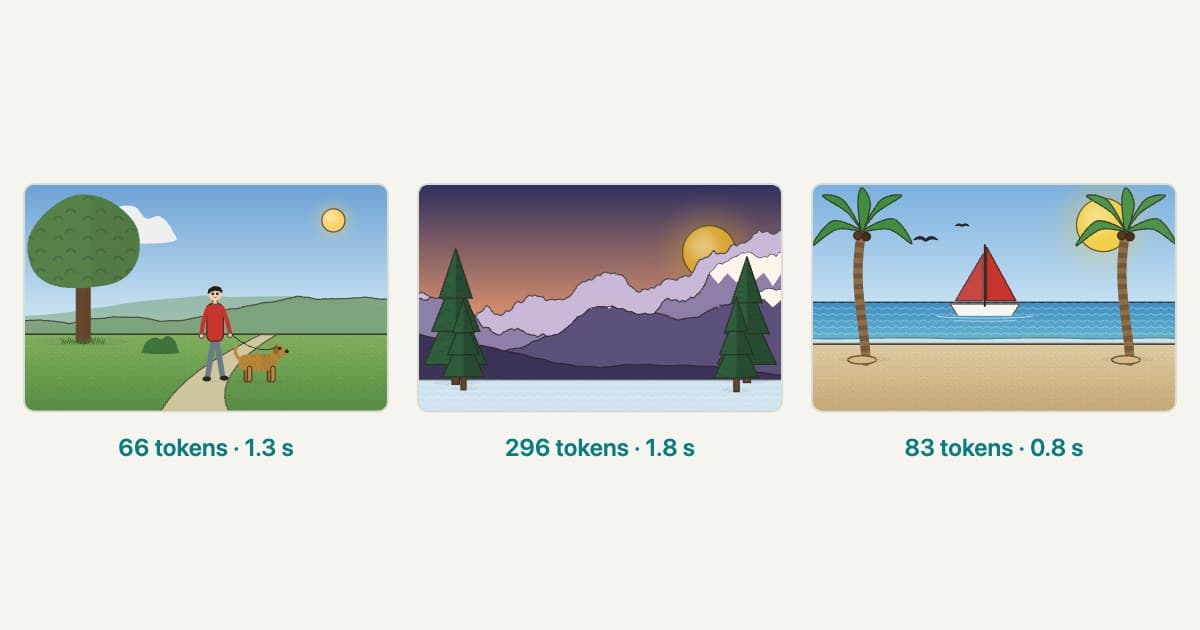
When people are learning, waiting is expensive. A ten-second pause for a picture is long enough to lose a train of thought, and long enough for a classroom to drift. So we set out to build a sketch tool that answers in about a second.
It works, and it runs on Claude's smallest, cheapest model with thinking turned off. But the speed doesn't come from the model. It comes from how little the model has to write.
At a glance
We asked for the same ten pictures three ways, three times each, and measured every call.
| Pre-built pieces | SVG written directly | SVG written directly | |
|---|---|---|---|
| Model | Claude Haiku 5.5 | Claude Haiku 5.5 | Claude Sonnet 5.5, a larger model |
| Tokens written per picture | 94 | 1,856 | 2,082 |
| Tokens read per picture | 1,798 | 79 | 79 |
| First picture on screen | 0.2 seconds | 7.8 seconds | 13.1 seconds |
| Finished picture | 1.1 seconds | 7.8 seconds | 13.1 seconds |
| Cost per 1,000 pictures | $0.23 | $0.94 | $20.98 |
The figures are medians of 30 pictures per method.
Why A.I. output is slow
Language models read and write in tokens, chunks of text a few characters long. The time an answer takes is roughly a fixed start-up, plus the time to read your request, plus the time to write the reply.
Writing is the slow part. A model reads all of your request at once, but writes its reply one token after another, each one waiting for the last. Our test shows how lopsided that is. The pieces method reads 23 times more tokens than the SVG method, because its instructions are long, yet its first token arrives just as fast: 0.48 seconds against 0.46.
So there are two ways to get an answer sooner:
- Write tokens faster. Run the same model on faster hardware. That costs more. Anthropic's fast mode for Claude Opus 5.5, for example, writes up to two and a half times faster and charges twice as much per token.
- Write fewer tokens. Use a model that says the same thing in fewer tokens, or change the job so the model doesn't need to write most of it.
A bigger model doesn't help much here. Sonnet wrote about as many tokens as Haiku for the same picture, wrote them more slowly, and cost more than twenty times as much.
The idea: write the tokens ahead of time
A picture written as SVG, the code a web page uses for drawings, is a long list of shapes, coordinates and colours. A simple beach scene runs to about 1,800 tokens, and most of them are the same every time: a palm tree is a palm tree.
So we drew the parts once and kept them in a library. The model no longer draws a palm tree. It writes put palm-tree with a position and a size, and ordinary code fills in the rest. The tokens that describe the tree were written ahead of time, once, and are reused in every picture.
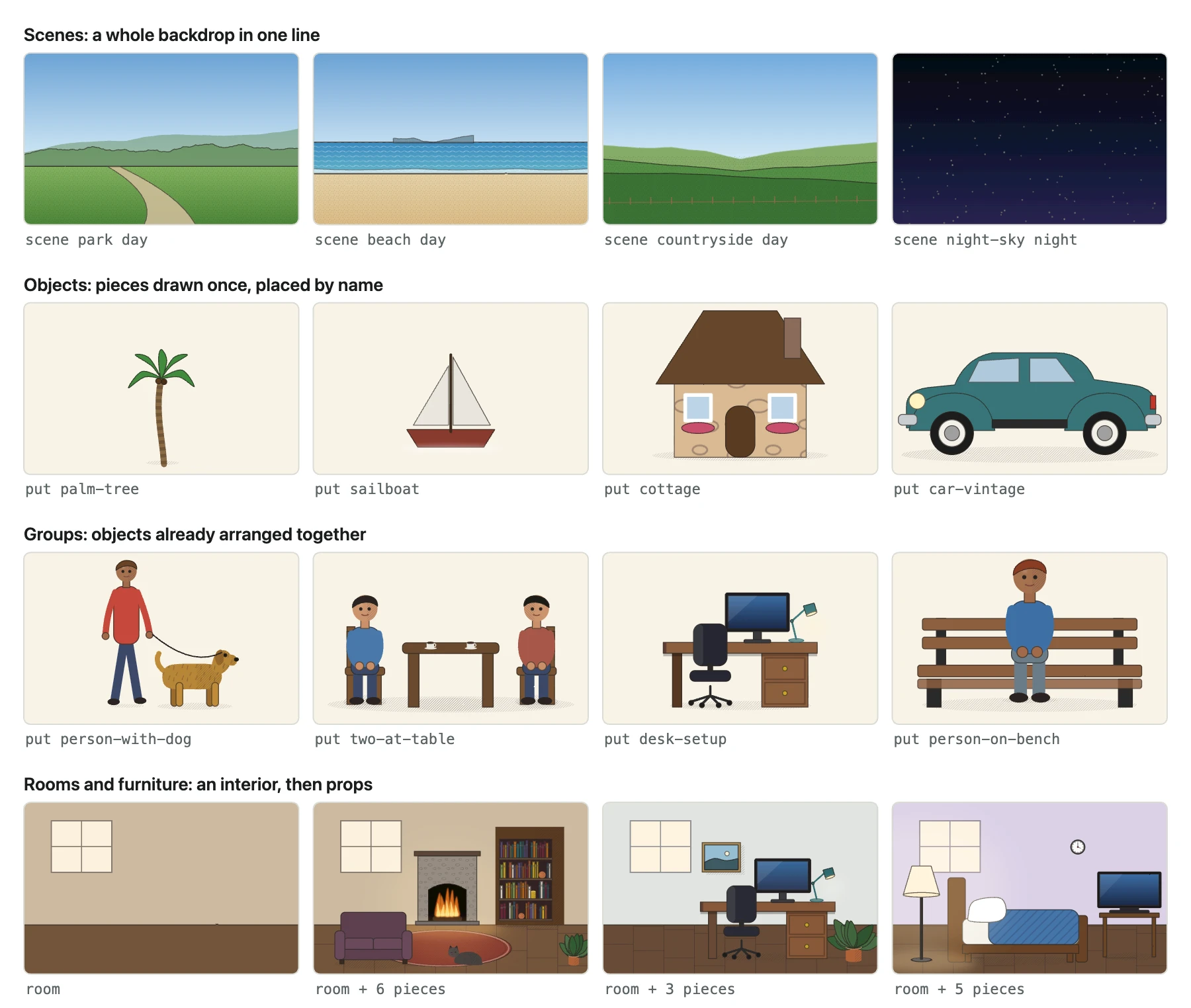
The library is organized in layers, from big to small:
- Scenes. A whole backdrop in one line: a park, a beach, the countryside, a stage, a night sky.
- Objects. 94 pre-drawn things, from trees and boats to people, food and furniture.
- Groups. Objects already arranged, like a person walking a dog or two people at a café table.
- Rooms. An interior with walls, a floor and a window, ready for props like a sofa or a fireplace.
Under those sit plain shapes, such as rectangles and curves, and a few generators, like one that draws a mountain ridge. The model reaches for those only when the library has no piece for the job.
What the model writes
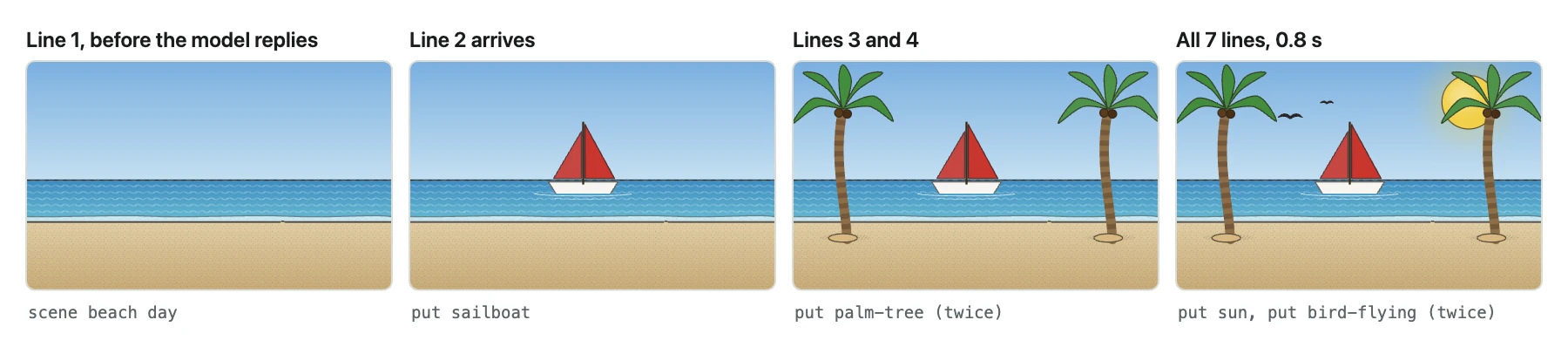
Here is everything Claude wrote for the beach at the bottom of the comparison further down, 83 tokens in all:
put sailboat 380 300 white red medium seed=326
put palm-tree 110 390 large seed=497
put palm-tree 690 390 large seed=659
put sun 640 90 yellow large seed=504
put bird-flying 250 120 small seed=73
put bird-flying 330 90 tiny seed=427
From lines like these, the drawing code produced a median of about 12,500 tokens' worth of SVG across our 30 test pictures, roughly 130 times what the model wrote. Part of that is texture and shading that a hand-written SVG wouldn't include, so treat 130 as the high end. Even so, nearly all of each picture was written before anyone asked for it.
How a request becomes a picture
- YouAsk for a picture“A sailboat off a sunny beach with palm trees”
- Code, no modelGuess the sceneCode matches words like beach or park to a backdrop and draws it at once.
- A small, fast modelWrite a short listOne line per piece, by name: put sailboat 380 300 red
- Code, no modelExpand and drawEach name becomes its pre-built drawing, with outlines, shading and paper texture added.
Three choices keep the wait short:
- The backdrop comes from code. If the request mentions a beach or a park, the tool draws that scene before the model replies. Half of our test pictures had their scene on screen before the model had written a word.
- Every line stands on its own. Each line names one complete piece, so the picture fills in as the lines arrive. An SVG only makes sense once it's finished.
- Style lives in the code. Outlines, hatched shadows, the direction of the light and the paper texture are added by the drawing code. The model never spends a token on them.
The model's job is mostly choosing pieces and placing them, which doesn't need deep reasoning. That's why the smallest model, with thinking off, is enough.
The test
We wrote ten picture requests that the library covers, such as "a cozy living room with a sofa, a fireplace, a bookshelf, a rug and a cat" and "a city street at night with streetlights, a bus and a vintage car". We ran each one three times through each method. The SVG methods got a plain request: draw an SVG picture of this, and reply with only the code.
Until the first picture shows
Until the picture is finished
The pieces method finished a picture about seven times faster than Haiku writing SVG, and about twelve times faster than Sonnet.
Tokens written
Tokens read
The pieces method reads more and writes far less. That's a good trade, because reading is fast and, on Haiku, five times cheaper per token than writing.
Per 1,000 pictures
A picture from pieces cost about a quarter of one Haiku wrote as SVG, and about a ninetieth of one from Sonnet. Most of what's left is the cost of reading the instructions, which caching could cut further.
Does it still look right?
Here are three of the ten requests side by side. The pieces method keeps the composition you asked for, with the right things in roughly the right places, in one consistent hand-drawn style.
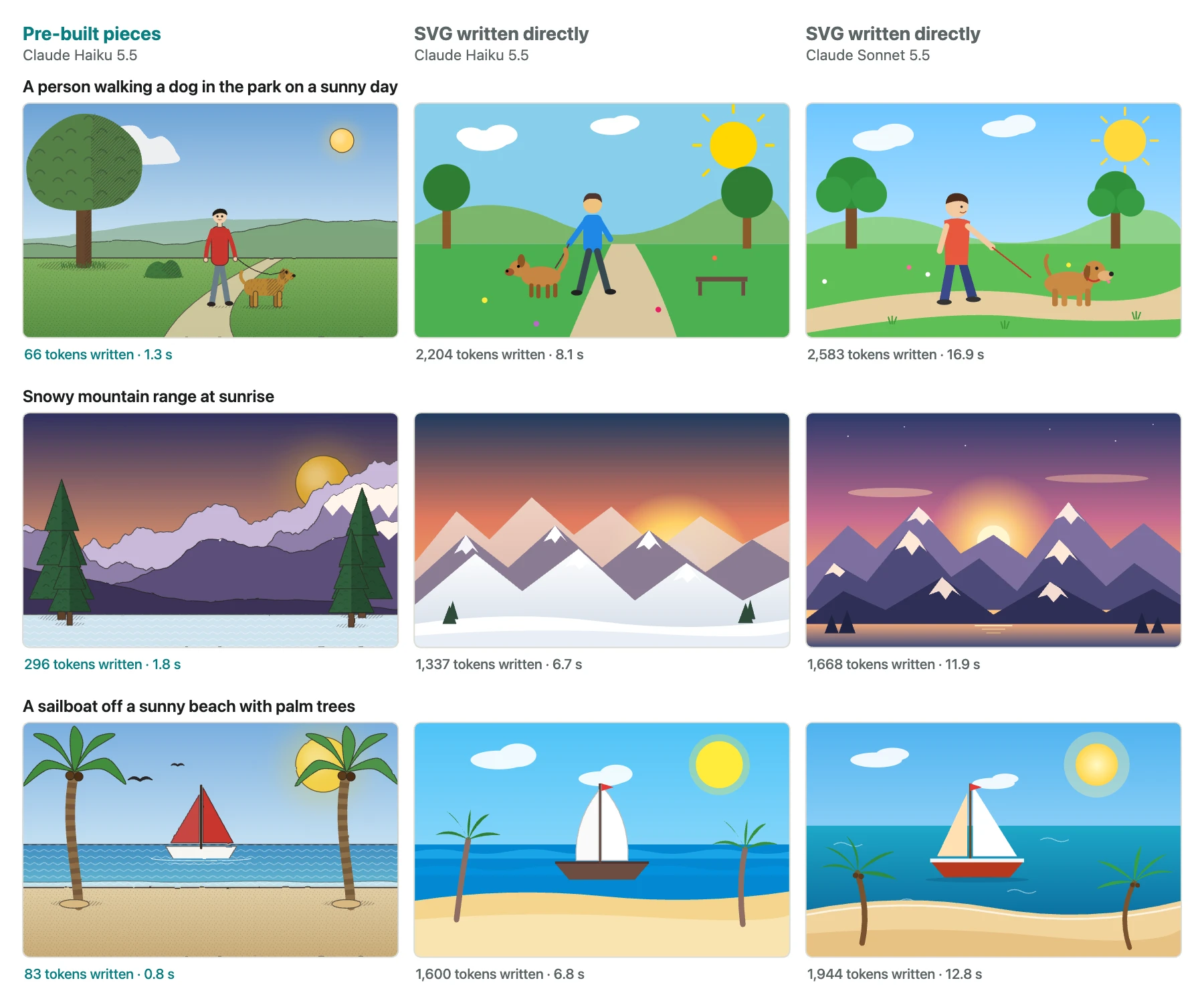
Two caveats on that picture. For the pieces we chose our favourite of eight runs per request, while the SVG columns show each model's first run, so treat it as an illustration rather than a contest. And the method isn't flawless: across all ten requests, a café sign covered the two friends it was meant to sit behind, and one stage had a guitar but no guitarist.
The mountains show the method's main limit. There's no pre-built mountain range, so the model drew one from ridge lines and placed each tree itself. That took 296 tokens and 1.8 seconds, about three times the other two. A gap in the library shows up directly as time and money.
Where it fits
This approach suits work where the same kinds of picture come up again and again, and where waiting gets in the way:
- Learning tools, where a picture should arrive while the idea is still fresh.
- Many pictures in one style, like illustrations for a course or a set of worksheets.
- Pictures people edit. Each line is one object, so a person can click it, move it or recolour it without asking the model again.
It suits one-off artwork, photographic realism and unusual subjects less well. The library takes real work to build, it decides what can be drawn well, and every picture shares its look.
How it could get better
The library is small: eight scenes and 94 objects. Most of what would improve the pictures comes from growing it, and from making better use of what's there.
- More pieces. Every gap costs tokens, as the mountains showed. A pre-built mountain range, more animals, more kinds of building and more furniture would each turn a dozen lines into one, and give more variety to choose from.
- More versions of each piece. One palm tree and one sofa make pictures look alike. A few versions of each, or poses for the people, would add variety without making the model write more.
- Let real requests show the gaps. When the model builds something from plain shapes, the library was probably missing a piece. Logging those lines shows which pieces to add next.
- Use a bigger model to grow the library. A large, slow model can draw new pieces once, ahead of time, where its speed and price don't matter. The small model then places them in a second.
- Smarter placement. Some misses were about where things went, not what they were: a sign in front of the people, two desks in one office. Rules in the drawing code, like keeping people in view and putting a TV on a table rather than the floor, would catch these without asking the model again.
- Cache the instructions. Reading the instructions is now most of the cost of a picture. They're the same every time, so caching them could make each picture cheaper still.
- More styles. The drawing code sets the look, so a second style, such as flat colour or watercolour, would change every picture at once without changing what the model writes.
Lessons for building your own
These come from one tool and one test, so treat them as observations rather than rules.
- Find out where the wait goes. Split it into start-up, reading and writing. For us, writing was almost all of it.
- Make the model's output short. Names and numbers, not markup.
- Move repeatable work into code and a library. Anything the model would write the same way every time can be written once, ahead of time.
- Send output in pieces that stand alone, so people see progress straight away.
- Use the smallest model that can make the choices, and turn thinking off when the job is choosing rather than reasoning.
- Watch for gaps. When a request falls outside the library, it costs more tokens, and more time.
The same idea should work beyond pictures: slides built from ready-made layouts, documents from templates, screens from interface components.
How we put this together
We measured every call ourselves through Anthropic's API on 31 October 2026, using Claude Haiku 5.5 and Claude Sonnet 5.5 with thinking off. Each method drew ten requests three times, and the figures are medians of those 30 pictures. Costs use the list prices on Anthropic's pricing page as of October 2026. The whole test, including an earlier round, cost about $1.50.
A few things to keep in mind. The sketch tool normally runs inside the Claude app, where we can't see which model it uses or what instructions surround it, so for the test we pointed the same code at the API. The ten requests were written to suit the library, which is the point of the method but also its limit. And the pictures above were redrawn from the model's saved lines after a fix that keeps suns and clouds behind the scenery; the timings come from the original runs.
